MenuTools is a simple program that extends the basic functionality of the Windows system menu.
Native builds are available for x86, x64, and Windows 11 ARM64. MenuTools runs one native coordinator with the tray UI and starts hidden hook hosts for the other application architectures. On ARM64, the ARM64 coordinator starts x86 and x64 hosts so emulated applications remain supported; on x64, the x64 coordinator starts an x86 host.
MenuTools supports Windows 7 SP1 and later. Frame-hosted UWP windows such as Calculator receive the Priority, Transparency, and Always on Top commands. Minimize to Tray remains unavailable for these windows. ApplicationFrameHost integration uses explicit injection and cooperative unload signaling rather than a persistent Windows hook, so closing all frame windows does not leave the hook DLL locked.
For portable use, keep MenuTools.exe, MenuTools64.exe, MenuToolsARM64.exe, and their matching hook DLLs in the same directory. Launch the executable matching Windows (MenuTools64.exe on x64 or MenuToolsARM64.exe on ARM64). Launching MenuTools.exe remains supported and redirects automatically to the native coordinator.
The lifecycle tests run entirely inside an ARM64 Windows Sandbox. They verify that MenuTools can attach to a standard window while it is in the background, and that it can detach cleanly even when the window is minimized.
The suite also launches a real frame-hosted UWP app and tests these shutdown sequences with ApplicationFrameHost.exe:
- close the frame, then stop MenuTools
- stop MenuTools, then close the frame
- close the frame and stop MenuTools concurrently
- stop MenuTools while the frame is minimized
- detach and reattach without closing the frame
Each scenario checks that the correct menu commands appear, cleanup completes, the processes exit as expected, and the hook DLL unloads. For frame-hosted apps, the tests also confirm that Minimize to Tray is not offered.
To build and run the suite, you need Windows Sandbox and the Visual Studio C++ ARM64 tools. From PowerShell, run:
Sandbox\Build-SandboxHarness.ps1 -LaunchResults are saved in Artifacts\SandboxResults. To build the Sandbox payload without launching it, omit -Launch.
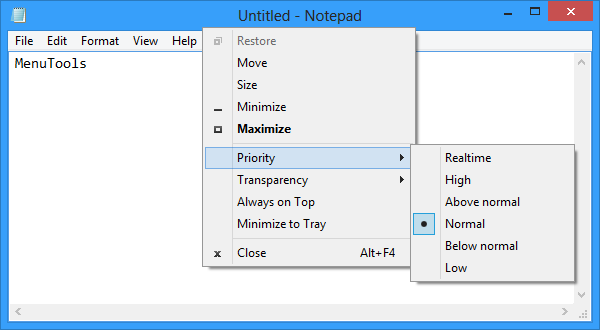
- Process priority
- Window transparency
- Always on top
- Minimize to tray
Example: Notepad running on Microsoft Windows 8 x64.
You can download the latest version of the binaries here.
Feel free to contact me about any questions, suggestions or problems.