


Languages: English / 简体中文
Development: 开发手册(中文)
Upgit is a native & lightweight tool that helps you upload any file to your Github repository and then get a raw URL for it.
This is also useful with Typora as an image uploader, and with the VSCode extension.
- Integrate with VSCode via extension
- Support for Linux, Windows and macOS
- Upload any file to given remote github repo folder
- Upload from clipboard
- Custom auto renaming rules
- CDN via replacing rules
- Config via Environment Variable
- Output URL to stdout/clipboard, supports markdown image format
- Github
- S3 Compatible Storages
- AWS S3
- MinIO
- Cloudflare R2
- Ceph
- Backblaze
- Flexify.IO
- IBM Cloud Object Storage
- DigitalOcean Spaces
- Wasabi
- Gitee (they block public image-bed repos; prefer SM.MS / S3 / OSS)
- Tencent QcloudCOS
- Qiniu Kodo
- Upyun
- AliyunOSS
- Hello
- Niupic
- SM.MS
- Imgur
- ImgUrl.org
- CatBox
- LSkyPro
- Chevereto
- ImgBB
- Cloudinary
- EasyImage
- DALEXNI
- img.tg
- Juejin
- Moetu
- NetEase
- Sogou
- upload.cc
- Lsky Pro v2
More: upgit uploaders
Download the latest zip from Releases.
If you have no idea which to download:
- For most Windows users, choose
upgit_win_amd64.zip- For Windows ARM, choose
upgit_win_arm64.zip- For Windows 32-bit, choose
upgit_win_386.zip- For Linux x64, choose
upgit_linux_amd64.zip- For Linux arm64, choose
upgit_linux_arm64.zip- For Linux 32-bit, choose
upgit_linux_386.zip- For Linux ARM, choose
upgit_linux_arm.zip- For most macOS users, choose
upgit_macos_arm64.zip- For macOS Intel, choose
upgit_macos_amd64.zip- Execute
chmod +x upgitif permission is needed
Unzip it, rename the binary to upgit (For Windows users, upgit.exe), save it to somewhere you like. To access it from anywhere, add its directory to the PATH environment variable.
Run upgit update to replace this binary with the latest stable GitHub release. upgit update --beta / --alpha opt into those channels. config.toml and customized recipes are left in place.
Run upgit init. It writes a GitHub config.toml and prints the path. You can also create config.toml in the same directory of upgit.
Fill it in following this sample config file.
The repository must be public. Private repos make raw URLs 404.
Personal Access Token (PAT): a classic token with the repo scope, or a fine-grained token with Contents: Read and write on that repository. Create a token at GitHub Settings → Developer settings → Personal access tokens.
To upload file logo.png with rename rules, execute:
./upgit logo.png
# for windows: .\upgit.exe logo.png
Then you'll see a link to logo.png.
To upload file logo.png to remote folder /my_images/demo, execute:
./upgit logo.png -t /my_images/demo
# for Windows: .\upgit.exe logo.png -t /my_images/demo
For more help, type -h argument
Upload anything to github repo or other remote storages and then get its link.

Usage: upgit [OPTIONS] [FILE]...
       upgit <COMMAND>

Commands:
  init       Write a GitHub config.toml
  update     Replace this binary with a GitHub release (does not overwrite config.toml)
  uploaders  List built-in uploaders
  help       Print this message or the help of the given subcommand(s)

Arguments:
  [FILE]...  Local files to upload

Options:
      --clipboard                Upload the image currently on the clipboard
      --clipboard-files          Upload files copied on the clipboard (file list)
  -u, --uploader <UPLOADER>      Uploader id (see `upgit uploaders`)
  -o, --output <OUTPUT>          stdout or clipboard (clipboard copies the URL) [default: stdout] [alias: --output-type] [possible values: stdout, clipboard]
  -f, --format <FORMAT>          url | markdown | named [alias: --output-format]
  -t, --target-dir <TARGET_DIR>  Keep the original filename under this remote directory
  -s, --size-limit <SIZE_LIMIT>  Maximum file size in bytes (0 = unlimited)
  -c, --config <CONFIG>          Path to a TOML config file [alias: --config-file]
  -r, --raw                      Skip [link] replacements
  -C, --clean                    Delete local files after a successful upload
  -V, --verbose                  Print uploader, object key, and URL to stderr
  -w, --wait                     Do not exit after upload until the user presses a key
  -n, --no-log                   Disable writing upgit.log (history.log is still written)
      --application-path <PATH>  Directory that owns config.toml / upgit.toml, history.log, and upgit.log
      --version                  Print version
  -h, --help                     Print help

Uploaders (pass --uploader ID, or set default in config.toml):
  github      GitHub
  s3          Amazon S3 (MinIO / Cloudflare R2 / Backblaze / Wasabi / DigitalOcean Spaces / Ceph / Flexify.IO / IBM Cloud Object Storage)
  aliyunoss   Aliyun OSS
  qcloudcos   Tencent Cloud COS
  upyun       Upyun
  qiniu       Qiniu Kodo
  smms        SM.MS
  imgur       Imgur
  catbox      Catbox
  cloudinary  Cloudinary
  easyimage   EasyImage
  lskypro     Lsky Pro
  lskypro2    Lsky Pro v2
  hello       Helloimg
  niupic      Niupic
  imgurlorg   ImgURL.org
  imgbb       ImgBB
  chevereto   Chevereto
  gitee       Gitee
  dalexni     DALEXNI
  imgtg       img.tg
  juejin      Juejin
  moetu       Moetu
  netease     NetEase
  sougou      Sogou
  upload_cc   upload.cc

Create a config with `upgit init`. Update with `upgit update`. List ids with `upgit uploaders`.
https://github.com/pluveto/upgit
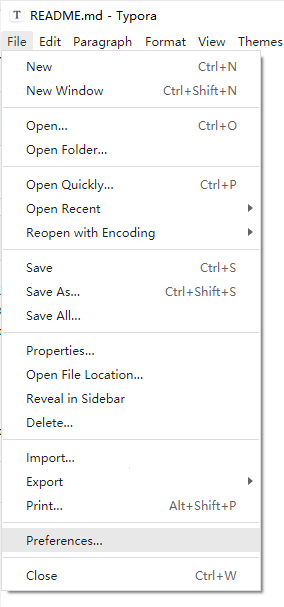
Assuming your upgit program is saved at
"C:\repo\upgit\upgit.exe".
Select File > Preferences...
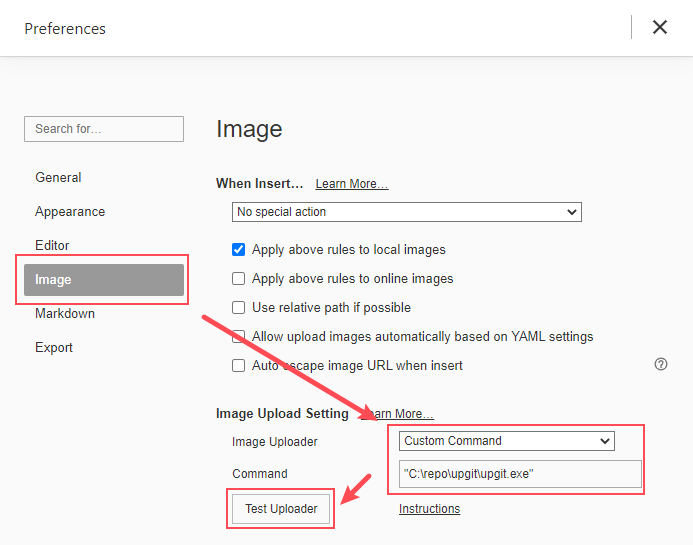
Move to Image. Choose Custom Command as your Image Uploader.
Input upgit program location into Command textbox.
You can click Test Uploader button to make sure it works.

Now enjoy it!
Upload the clipboard image as png:
./upgit --clipboardShortcuts for screenshot:
- On macOS, use
Ctrl+Shift+Cmd+4 - On Linux/Ubuntu, use
Ctrl+Shift+PrintScreen - On Windows, use
Shift+Win+s
On Linux, clipboard access needs xclip (X11) or wl-clipboard (Wayland).
Compatible with Snipaste (Windows): Snipaste bitmap screenshots can be uploaded the same way.
Note: This feature is only supported on Windows.
Upload files copied in Explorer (CF_HDROP):
./upgit --clipboard-filesUse --output clipboard (alias --output-type):
upgit logo.png --output clipboard
# or .\upgit.exe --clipboard -o clipboardAdd argument -f markdown (alias --output-format):
upgit logo.png --output clipboard -f markdown
# or .\upgit.exe --clipboard -o clipboard -f markdown
Then you'll get a markdown image link in your clipboard like:

For Windows user:
-
Install AHK
-
Create this script
upload_clipboard.ahkand run:; Press Ctrl + F9 to upload clipboard image ^F9:: RunWait, "upgit.exe" --clipboard --output clipboard --format markdown return
-
Then press WinShiftS to take screenshot. CtrlF9 to upload it and get its link to your clipboard!
| Key | Desc |
|---|---|
| username | Your Github username, like pluveto |
| repo | Your Github repository name, like upgit |
| branch | The branch for saving files, like master or main |
| pat | Personal Access Token. Visit GitHub Docs for more info |
| rename | Renaming rule. Path separator / will create directories if not exists. Supporting: |
-- {year} |
-- Year like 2006 |
-- {month} |
-- Month like 01 |
-- {day} |
-- Day like 02 |
-- {hour} |
-- Hours of current time |
-- {minute} |
-- Minutes of current time |
-- {second} |
-- Seconds of current time |
-- {unix_ts} |
-- Unix timestamp in second. Like 1643373370. |
-- {unix_tsms} |
-- Unix timestamp in millisecond. Like 1644212979622. |
--- {ext} |
-- Extension like .png, and empty when the original file has no extension |
-- {fname} |
-- Original file base name like demo (without extension) |
-- {fname_hash} |
-- MD5 Hash in hex of {fname} (name without extension) |
-- {fname_hash4} |
-- MD5 Hash in hex of {fname}, first 4 digits |
-- {fname_hash8} |
-- MD5 Hash in hex of {fname}, first 8 digits |
-- {hmac} |
-- HMAC-SHA256 hash of hmac_format, truncated to hmac_len |
| hmac_key | Secret key for calculation {hmac} |
| hmac_format | Format string for {hmac} calculation. Supporting all above placeholders. |
| hmac_len | Length of {hmac} hash. 0 means no truncation. |
Here is a simplist sample config file:
rename = "{year}/{month}/upgit_{year}{month}{day}_{unix_ts}{ext}"
[uploaders.github]
pat = "ghp_XXXXXXXXXXXXXXXXXXXXXXXXXXXXXXXXXXXX"
repo = "repo-name"
username = "username"
branch = "main"
The config file is searched in this order:
--config/--config-file./config.toml$XDG_CONFIG_HOME/upgit/config.tomlor%APPDATA%\upgit\config.toml~/.upgit.config.toml~/.config/upgitrcconfig.tomlandupgit.tomlnext to the binary
--application-path changes the binary-dir lookup. After each upload, history.log (and upgit.log unless --no-log) is written in that directory.
UPGIT_TOKENUPGIT_RENAMEUPGIT_USERNAMEUPGIT_REPOUPGIT_BRANCH
Any config key can also be set with UPGIT_ and __ for nesting (Kong-style):
export UPGIT_DEFAULT=smms
export UPGIT_UPLOADERS__GITHUB__PAT=PASTE_YOUR_TOKEN
export UPGIT_UPLOADERS__GITHUB__USERNAME=your-user
export UPGIT_NAMING='{year}/{month}/{fname}_{unix}{ext}'In following way:
[output_formats]
"bbcode" = "[img]{url}[/img]"
"html" = '<img src="{url}" />'
"markdown-simple" = ""Placeholder:
{url}: URL to image{fname}: Original file basename{url_fname}: File basename from url
Example usage:
# Upload clipboard and save link to clipboard as bbcode format
upgit --clipboard -o clipboard -f bbcode
If you used the previous Go 0.2 upgit, flags such as :clipboard and --output-type, config paths, and Qiniu credentials changed. There is no extensions/ directory. See Upgrading from 0.2.
Optional: cargo install --git https://github.com/pluveto/upgit